
Guides
Accept CBTC with Payvol
This guide and its example project are in github.com/cayvox/payvol-examples.
Ask for a CBTC payment with a link or a QR code, let the payer check it before they sign, and match the payment to your invoice on your own ledger. This guide walks through it on DevNet, first in the browser and then in code.

Your first payment in five minutes
You need two DevNet wallets: one to pay from, one to be paid into.
- Get test CBTC. Open the BitSafe faucet, paste the paying wallet's party ID, and request CBTC. If it arrives as an offer, accept it in that wallet.
- Ask to be paid. On payvol.xyz/app/request, choose
CBTC, enter
0.01, the referenceINV-0001, and the receiving wallet's party ID. Press Copy the link. - Pay. Open the link, or paste it on payvol.xyz/app/pay. Read the review, press Connect a wallet to pay, choose the paying wallet, and approve the transfer there.
- Match it. On payvol.xyz/app/match, in the same browser, connect the receiving wallet.
Expected result: a row with INV-0001, marked matched, and the CBTC that moved.
The rest of this guide explains each step, and how to do the same from code.
1. What CBTC is
CBTC is a Bitcoin-backed token on the Canton Network, issued by BitSafe. It is a Canton Token Standard (CIP-0056) instrument, served by the Digital Asset Utility Registry. Payvol treats it like any token-standard instrument: an admin party and an id. BitSafe's documentation, docs.bitsafe.finance, is the authority on CBTC itself.

2. What you need
| For | You need |
|---|---|
| The browser path | A DevNet wallet that can pay a CIP-0056 transfer (see below), and the party ID of the receiving wallet |
| The code path | Node.js 20.19.0 or later, and for paying and observing, a Canton participant with its JSON Ledger API and a party on it |
A party ID looks like name::1220 followed by 64 hexadecimal
characters. Copy it whole: a shortened party ID is the most common reason a payment cannot be
made.
Wallets, as of 2026-10-19. Payvol hands the transfer to the wallet through PartyLayer.
- Loop has paid a CBTC request through Payvol on DevNet.
- Console and Nightly implement the same transfer call in their PartyLayer adapters, and have not been tried with CBTC.
- Walley received that payment, and Match read it through Walley. Sending from Walley through Payvol is coming soon.
3. Get test CBTC
BitSafe runs a faucet for DevNet and TestNet.
- Open the faucet with DevNet and CBTC selected.
- Enter the receiving party ID and request test tokens.
- If the tokens arrive as an offer, accept it in the wallet. BitSafe notes that the receiving participant must have the DA Utility Registry installed. Both wallets used for this guide, Loop and Walley, received CBTC on DevNet.
Expected result: the wallet shows a CBTC balance. Faucet tokens are not MainNet assets.
4. Read CBTC's identity from the registry
Never type CBTC's admin party, id or decimals into your code. Read them from the registry, refresh them every few minutes, and warn when they change. BitSafe states that the admin and id can change with upgrades and that nothing announces it (Instrument ID Management).
The example project does this for you. Set it to DevNet first, so the requests it builds match the app:
cd examples/cbtc
npm install && npm run build
cp .env.example .env
export NETWORK=devnet           # or set NETWORK=devnet in .env
npm run refresh-metadata
Expected result: JSON with "network": "devnet", the DevNet registry,
CBTC's admin party, "id": "CBTC", "decimals": 10 and "source": "registry".
The identity per network, as BitSafe publishes it and as the registry answered on 2026-10-18:
| Network | Registry | Admin party |
|---|---|---|
| MainNet | https://api.utilities.digitalasset.com | cbtc-network::12205af3b949a04776fc48cdcc05a060f6bda2e470632935f375d1049a8546a3b262 |
| TestNet | https://api.utilities.digitalasset-staging.com | cbtc-network::12201b1741b63e2494e4214cf0bedc3d5a224da53b3bf4d76dba468f8e97eb15508f |
| DevNet | https://api.utilities.digitalasset-dev.com | cbtc-network::12202a83c6f4082217c175e29bc53da5f2703ba2675778ab99217a5a881a949203ff |
The instrument id is CBTC on all three. The metadata lives at
{registry}/api/token-standard/v0/registrars/{admin}/registry/metadata/v1/instruments.
5. Create a payment request
A Payvol request is a canton: URI. The same bytes can be a link, a QR code or an NFC
tag.
In the browser. On payvol.xyz/app/request, choose CBTC. The page reads CBTC's decimals from the registry and refuses an amount with more.
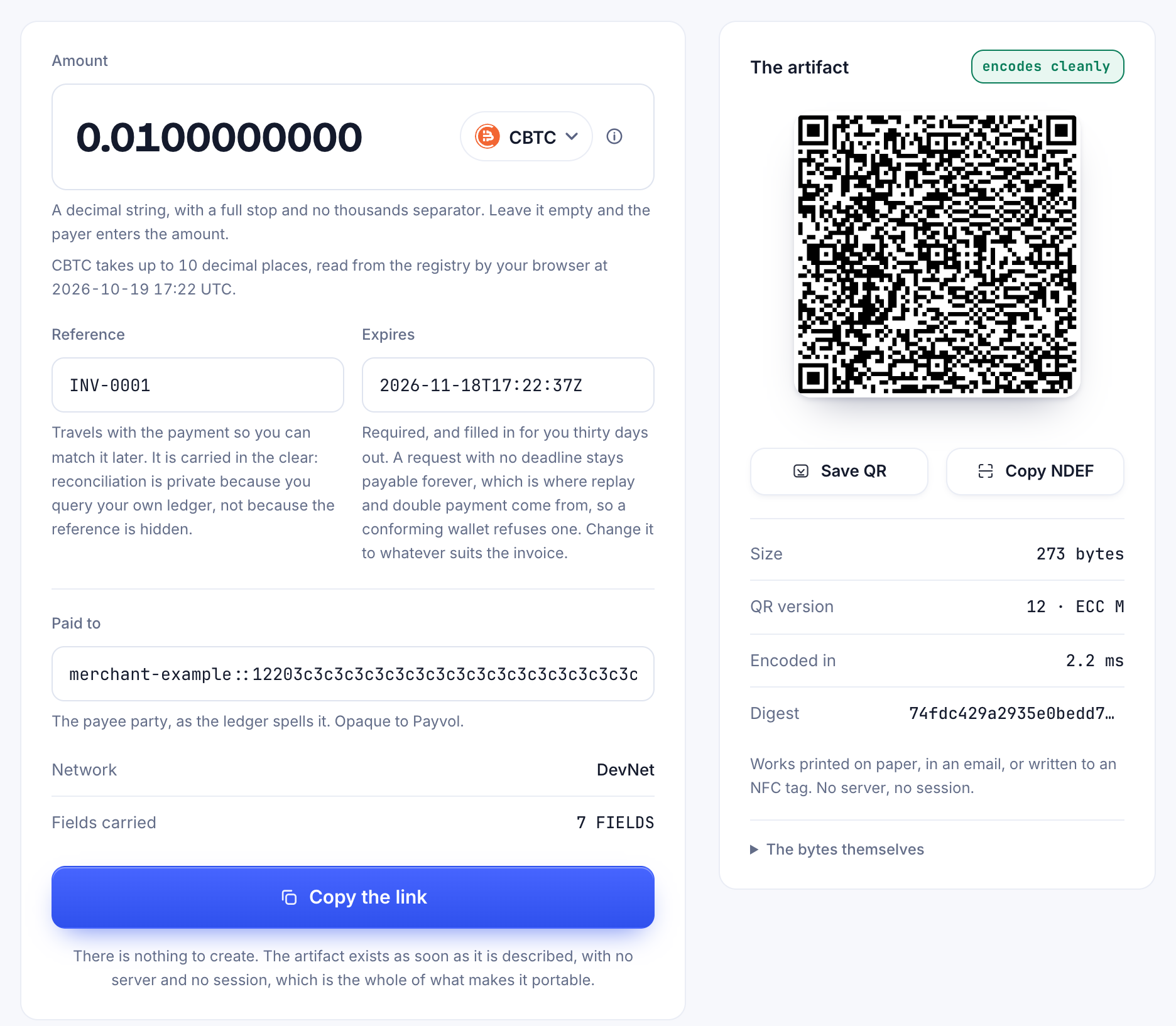
In code.
npm run create-request -- \
  --recipient payvol-demo-recipient::1220abababababababababababababababababababababababababababababababab \
  --amount 0.0100000000 --expiry 2027-01-01T00:00:00Z --reference INV-0001 --qr
Expected result: JSON with "network": "devnet", the uri, a web+canton: link and the request's digest, then a QR code. Replace the placeholder
recipient with the real party ID. An amount with more than 10 decimal places is refused, never
rounded: a rounded amount would be a different request.
6. Verify the request
Anyone can check a request before paying it. Verification reads it the way a wallet would, and checks it against what the registry says CBTC is on this network.
In the browser. Paste it on payvol.xyz/app/verify.
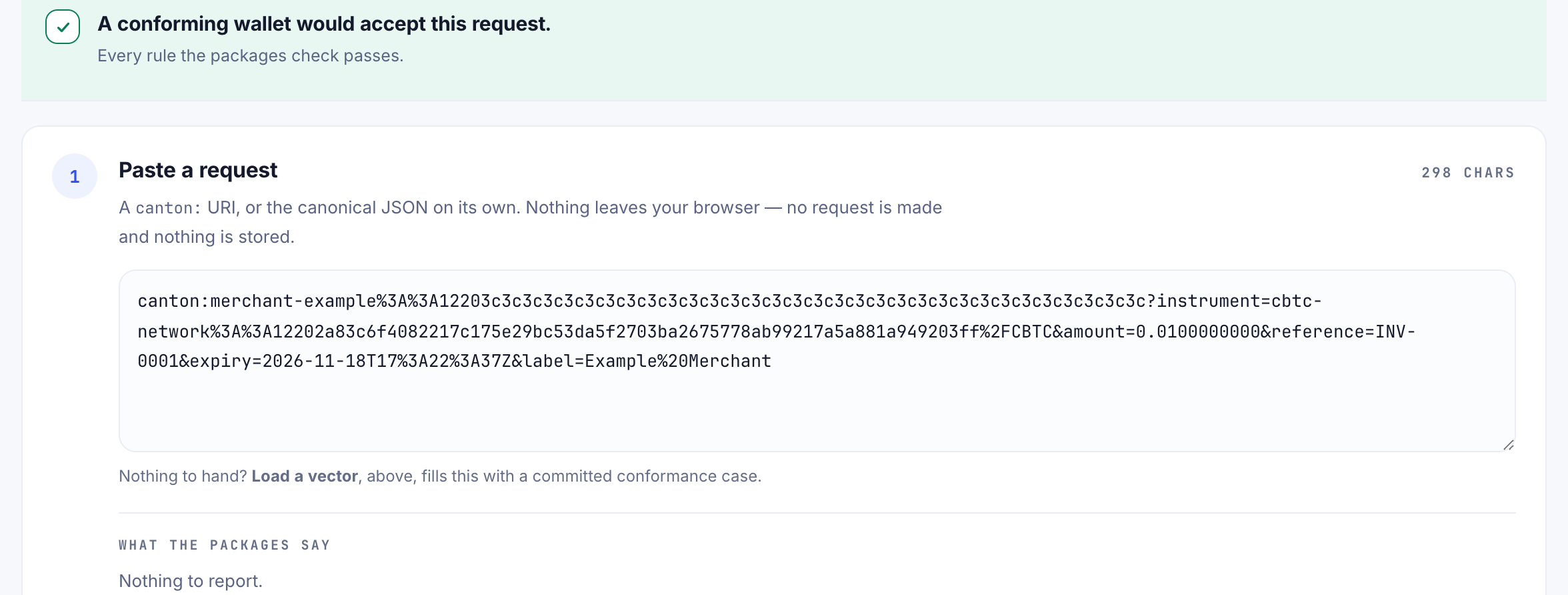
In code.
npm run verify-request -- '<the canton: URI from step 5>' Expected result: "valid": true and "warnings": []. Read the warnings: a request for something that calls itself CBTC under another party is
valid as a request and comes back with an ADMIN_NOT_CBTC_REGISTRAR warning. Keep
the single quotes, because the URI contains ? and &. The same URI
read with NETWORK=mainnet is refused with NOT_THIS_NETWORK, because each
network's CBTC has its own registrar.
7. Pay

With a wallet
Paste the request on payvol.xyz/app/pay. The page shows what signing would do before any wallet is involved: who is paid, the asset, the exact amount, the reference and the deadline. The name in the request is the requester's own words. Payvol marks it name not verified: check the party ID, not the name.
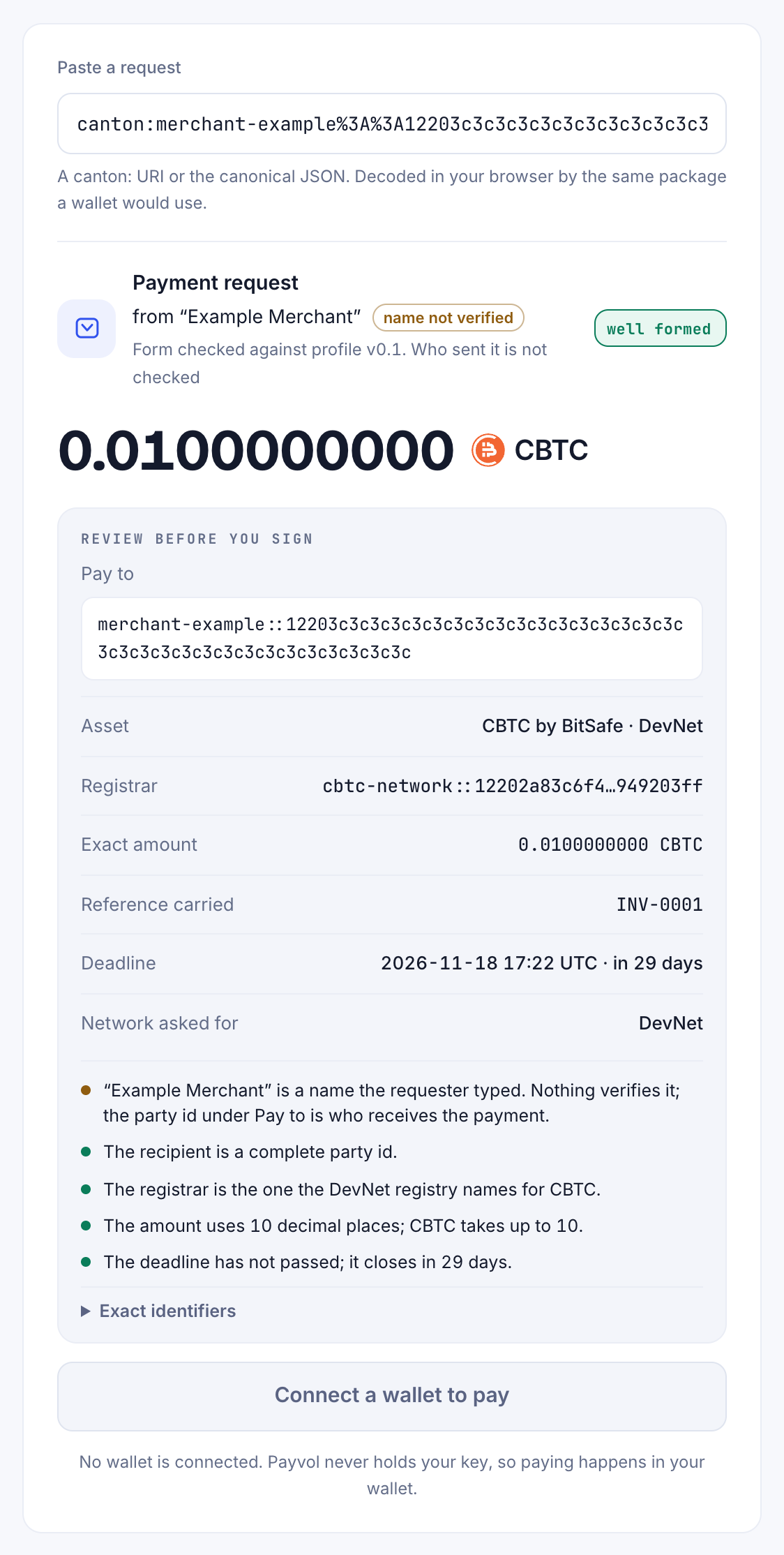
Press Connect a wallet to pay, choose your wallet, and approve the transfer in it. The wallet builds the transfer with the registry and shows it to you again. Payvol never sees your key.
Expected result: Pay reads the transfer back and says Paid. when
it completed, or Offered, and nothing has moved yet. when it is waiting for the
payee to accept. On this path, the request's reference reaches the ledger as the Token Standard's
reason, and nothing else from Payvol does: the PartyLayer adapters for Console, Loop
and Nightly accept a memo and no other metadata.
With the SDK, on your own participant
npm run pay -- '<the canton: URI>' pay refuses a request this network's CBTC cannot pay. It then picks holdings, asks
the registry for the transfer factory, prints the transfer command it will submit, and submits only after you type yes. For an external party, your participant
prepares the transaction and pay signs the hash it returns without decoding it, so
this path trusts your own participant to prepare what you reviewed.
Expected result: an updateId. Keep it: the payee needs it in step
8. The transfer carries three values: splice.lfdecentralizedtrust.org/reason (your
reference), payvol.xyz/request-digest and payvol.xyz/profile. Anyone
who can read the transfer can read them.
8. See the payment and match it to the invoice
What the payee sees depends on how the transfer ended.

In the browser. On payvol.xyz/app/match, connect the receiving wallet in the browser that issued the request. Match reads your own party's view of the ledger through the wallet and marks each payment that carries a reference this browser issued.
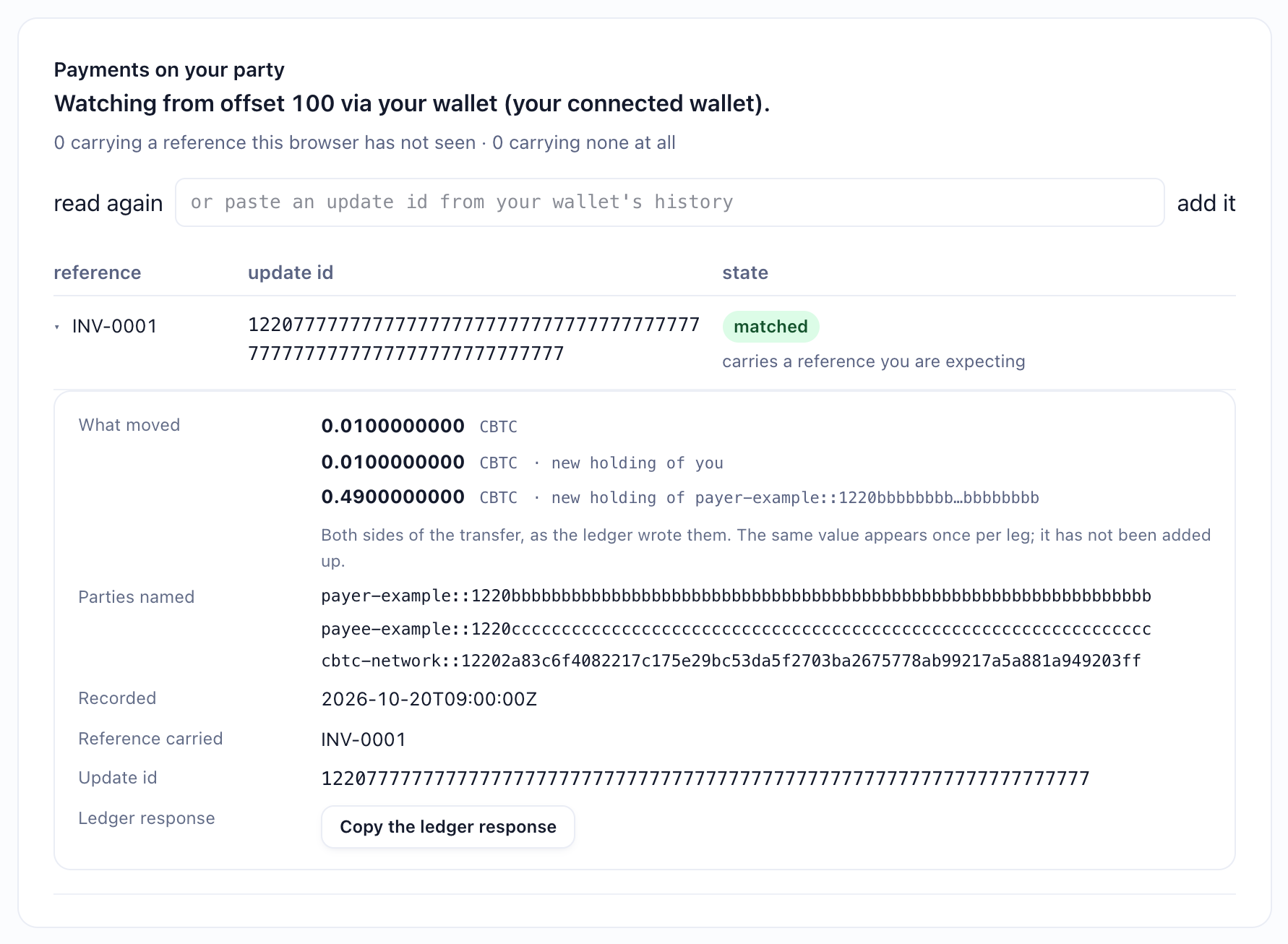
Expected result: INV-0001, marked matched. Open
the row to see what moved, by holding and owner.
In code. For a payment that arrived as an offer, the example records it on your
own participant with @payvol/core:
npm run instructions                                         # the open offers you can see
npm run resolve -- <instructionId> accept                    # prints the accept updateId
npm run trust-from-updates -- <offerUpdateId> <acceptUpdateId>
npm run observe -- '<the canton: URI>' <offerUpdateId> <acceptUpdateId>
<offerUpdateId> is the updateId the payer's pay printed
in step 7. <acceptUpdateId> is the one resolve printed. trust-from-updates needs only one offer and its acceptance, once.
Expected result: the outcome's lifecycle, settled, and four checks
against the request: the digest, the receiver, the instrument, and whether the amount covers it.

reconcile() in @payvol/core/draft02 returns, with synthetic
values. The example's observe prints four of these checks.
9. Move to MainNet
- Use MainNet's identity, from the registry. The admin party differs on each
network; set
NETWORK=mainnetand let the example read it. Never mix the networks: a TestNet admin in a MainNet request is a different instrument, andverify-requestrefuses it. - Real CBTC comes from real Bitcoin. There is no faucet. Most payers will hold CBTC they received by transfer. Minting it against BTC needs a Minter credential from BitSafe, as Mint CBTC describes.
- The app at payvol.xyz asks wallets for DevNet only today. On MainNet, use the code path.
10. Troubleshooting
| You see | Do this |
|---|---|
| Loop: "Action failed: Prepared transaction not found" when you press Confirm | In Loop's settings, switch the theme to Classic and pay again. Seen on DevNet on 2026-10-19 with Loop's New theme, where Classic worked. |
| Loop opens an unexpected wallet address |
Loop's wallet is at wallet.devnet.looptech.io since @fivenorth/loop-sdk 0.15.0. Use loop-sdk 0.15.0 or later; payvol.xyz ships 0.15.1.
|
"too many decimals", or AMOUNT_BEYOND_DECIMALS | The amount has more decimal places than the registry gives CBTC (10). Shorten it. Payvol never rounds. |
| The payment went through but no offer appeared |
The payee had pre-approved this payer, so the payment completed at once. Match shows it
today. The Observe library in @payvol/core does not record this path yet.
|
| Only your reference reached the ledger |
That is the wallet path: the wallet carries the reference, as reason, and
nothing else. The request's digest and profile reach the ledger on the SDK path.
|
Sources
| Claim | Source |
|---|---|
| CBTC's admin party and registry per network, and that the admin and id can change |
BitSafe, Instrument ID Management; the registry's own /registry/metadata/v1/info and /instruments answers, committed in the example project's registry fixtures |
| CBTC has 10 decimal places | The same registry answers, 2026-10-18 |
| The faucet, DevNet and TestNet only; the receiving participant needs the DA Utility Registry | BitSafe, Integrations |
| CBTC is backed 1:1 by Bitcoin | BitSafe, Minting CBTC ("Each CBTC is backed 1:1 by Bitcoin held in decentralized custody") and Proof of Reserve |
| Canton Coin, stablecoins such as USDCx, and CBTC are Token Standard assets | The Splice token standard ("Amulet implements the token standard"); Canton, USDCx support; the CBTC registry answers above |
| Taproot (P2TR) deposit addresses, unique to a deposit account | BitSafe, Minting CBTC |
| The Attestor Network, FROST, minting, the Minter credential, redeeming | BitSafe, Attestor Network and FROST, Mint CBTC, Redeem CBTC |
| Offers, acceptance, and transfers that complete without acceptance |
BitSafe, Transfer and receive CBTC; the Token Standard's TransferInstructionV1 (results Pending, Completed,
Failed), in the Splice repository |
| Which wallets carry the transfer call, and that they carry only a memo |
The published PartyLayer adapters: @partylayer/adapter-loop 0.5.1, @partylayer/adapter-console 0.4.0 and @partylayer/adapter-nightly 0.3.0 implement requestTransfer with a memo only
|
| Loop paid CBTC through Payvol; that payment completed in one step and matched | A DevNet payment on 2026-10-19, read on the payee's own ledger view |
| Loop's new wallet address | @fivenorth/loop-sdk 0.15.0 on npm; fivenorth-io/loop-sdk release v0.15.0
|
| What the SDK path puts on the ledger | examples/cbtc/src/transfer.ts |
What reconcile() returns | @payvol/core 0.4.0, draft02 |